




Quickstart Guide To Sui gRPC & GraphQL Data Access

April 16, 2026
3 min read
Get live Sui blockchain data in minutes using high-performance and flexible query interfaces.
What You're Working With
Ankr provides production-grade access to Sui through two primary interfaces built for modern applications:
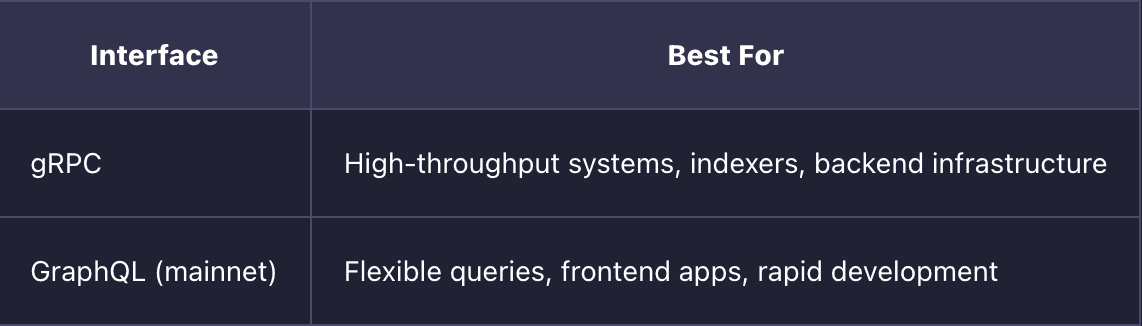
Both are designed to give you efficient, scalable access to on-chain data without unnecessary overhead.
Step 1: Get Your Endpoint
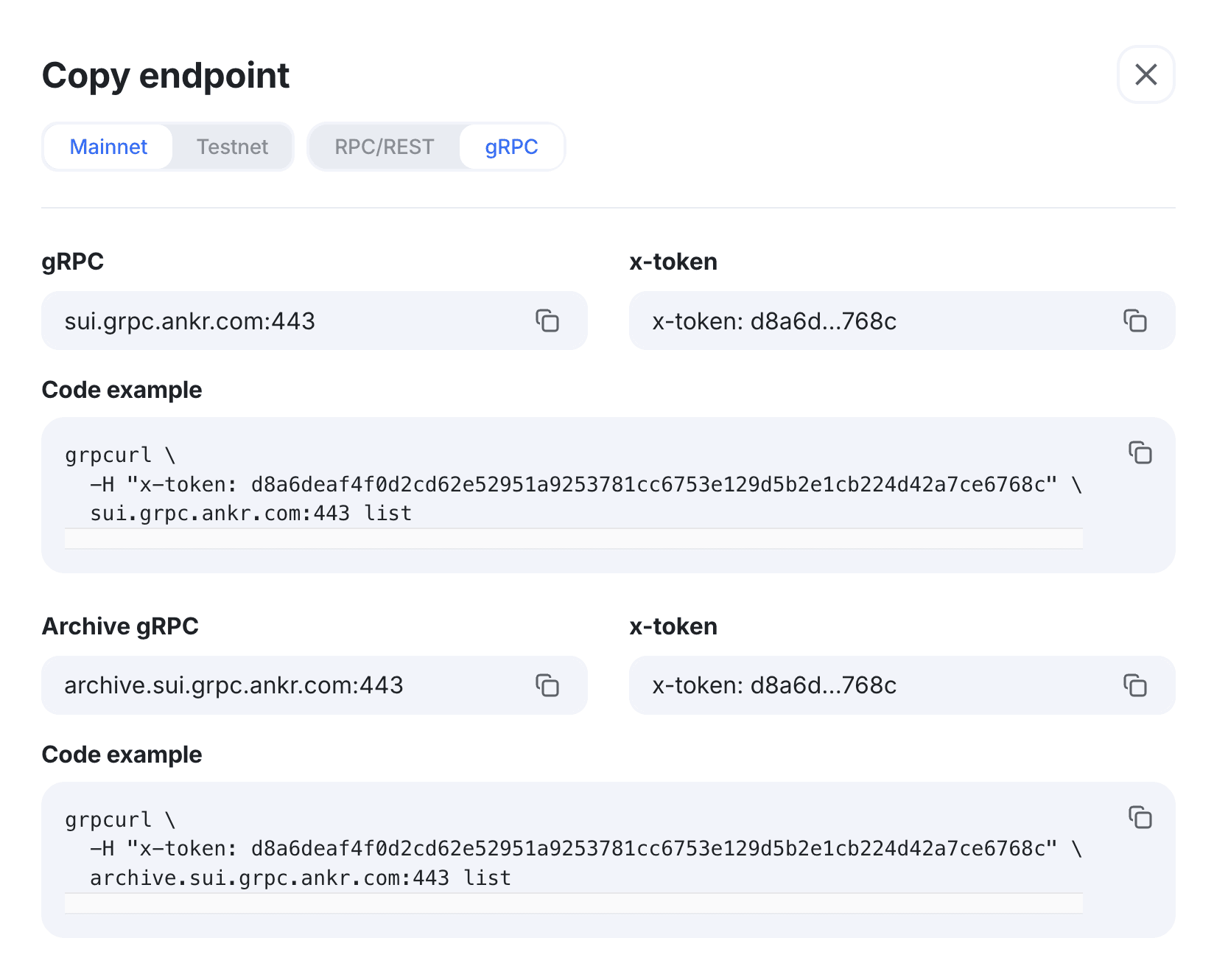
Create an account on Ankr’s Web3 API service. No credit card required.
Search for Sui and copy your endpoint for GraphQL or gRPC.
Add it to your environment variables or config.
Step 2: Verify Your Connection
Before building, confirm your connection is working and synced.
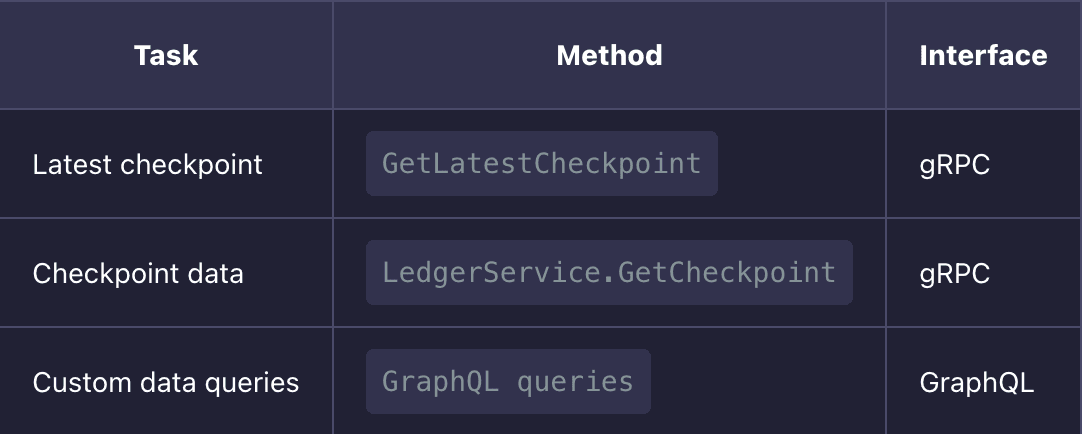
With gRPC, call a lightweight method like GetLatestCheckpoint to confirm you are connected and receiving up-to-date data.
With GraphQL, run a simple query to fetch the latest checkpoint or basic chain data.
This quick check ensures you are working against the correct network from the start.
Step 3: Explore Data with GraphQL
GraphQL is the fastest way to start working with Sui data.
It allows you to request exactly the fields you need, making it ideal for:
- Frontend applications
- Dashboards and analytics
- Rapid prototyping
Typical queries include:
- Wallet balances and owned objects
- Transaction history with filters
- Structured views of on-chain data
Because GraphQL avoids over-fetching, responses stay lightweight and efficient even as your queries grow more complex.
Full reference: Ankr Sui GraphQL docs
Step 4: Build High-Performance Systems with gRPC
For production systems that require speed and scale, you can use gRPC.
gRPC uses binary serialization over HTTP/2, which improves performance and reduces latency compared to text-based protocols.
Best suited for:
- Indexers and ingestion pipelines
- Backend services processing large volumes of data
- Infrastructure that needs consistent, low-latency access
Authentication is simple. Pass your API token in the x-token header.
Use read_mask to request only the fields you need and keep payload sizes minimal.
To get started:
brew install grpcurl
You can immediately begin testing endpoints and inspecting responses from the command line.
Full method reference for mainnet, testnet, and archive: Ankr Sui gRPC docs
Step 5: Choose the Right Interface
Use GraphQL when:
- You need flexibility in how data is shaped
- You are building user-facing applications
- You want to iterate quickly without managing complex request structures
Use gRPC when:
- You need maximum throughput and performance
- You are processing large volumes of blockchain data
- You are building backend systems or infrastructure
Many production systems use both. GraphQL for querying and exploration, gRPC for ingestion and scaling.
Step 6: Use the TypeScript SDK
Most applications use the official @mysten/sui SDK.
It integrates directly with Ankr endpoints and simplifies working with Sui data by handling serialization, typing, and request structure for you.
Install:
npm i @mysten/sui
Initialize the client with your endpoint and start building.
Full SDK documentation is available at docs.sui.io.
Quick Reference
Need More Info?
- gRPC methods: Ankr Sui gRPC docs
- GraphQL (mainnet): Ankr Sui GraphQL docs
- Enterprise/custom needs: sales@ankr.com
Join the Conversation on Ankr’s Channels!
X | Telegram | Substack | Discord | YouTube | LinkedIn | Reddit
Similar articles.
Ankr Launches Premium RPCs for Unichain! Powering the DeFi-Native L2 from Uniswap Labs
February 9, 2026
Ankr is excited to announce the launch of Unichain RPCs on our Web3 API service, now available exclusively for Premium users. With Ankr’s Premium Unichain...
![What is gRPC: A Comprehensive Guide [2024]](https://assets.ankr.network///what_is_grpc_5f8b7840e5_18e663df18.jpg)
What is gRPC: A Comprehensive Guide [2024]
April 30, 2024
gRPC, or Google Remote Procedure Call, is an open-source RPC framework initially developed by Google. It allows efficient communication between distributed systems using a variety...